
Kev qhia yooj yim
Daly nyuam qhuav tso tawmWIFI module tuaj yeem paub txog BMS-ywj pheej xa mus rau chaw taws teeb thiab sib xws nrog txhua lub software tiv thaiv tshiab.
Thiab lub xov tooj ntawm tes APP tau hloov kho tib lub sijhawm kom coj cov neeg siv khoom yooj yim dua rau kev tswj hwm thiab siv cov roj teeb lithium yooj yim dua.
Kev piav qhia txog khoom
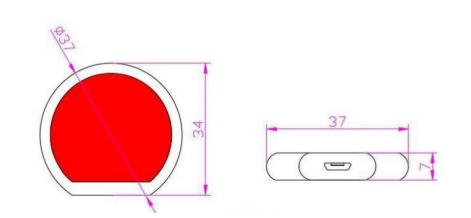
Qhov Loj:
Qhov Loj:
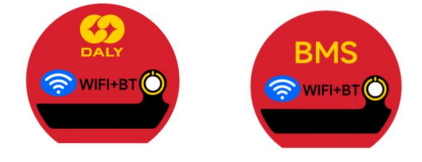
Daim duab nplaum: Lithium/neutral (cov lej khoom sib txawv)
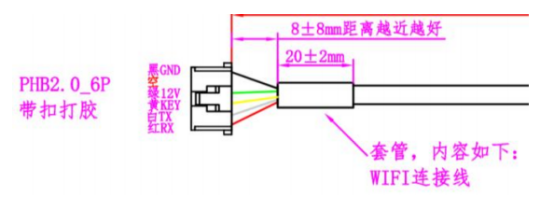
Tus pin txhais: Qhov kawg ntawm txoj hlua khi (txuas nrog lub rooj tsavxwm tiv thaiv, raws li UART interface ntawm lub rooj tsavxwm tiv thaiv, nrog lossis tsis muaj buckles, tsis muaj stus lej khoom siv ame)
Siv kev nqis tes ua
1. Kev Npaj: Xyuas seb cov khoom puas tiav thiab seb lub xov hlau txuas puas yog "WIFI cable". Paub tseeb tias lub network wireless yog 2.4G
Lub network tuaj yeem txuas nrog ib txwm thiab surf Internet, txuas lub xov tooj ntawm tes rauWIFI network.
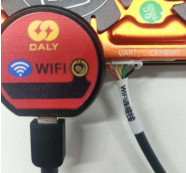
2. Nruab cov khoom: Ntxig lubWIFI module mus rau hauv qhov chaw nres nkoj sib txuas lus UART ntawm BMS los ntawmWIFI cable; (Raws li qhov kev lees paub
Lub UART interface ntawm lub phaj tiv thaiv muaj nrog lossis tsis muaj buckles, thiab cov lej khoom sib txawv)
3. Nruab lub APP: Nruab lub"SMARTBMS"APP los ntawm lub khw app lossis QR code, thiab muab cov kev tso cai sib xws.
Qhib lubWIFI, Bluetooth, thiab cov haujlwm ntawm koj lub xov tooj.
4. Kev ua haujlwm ntawm APP: Nyem rau nkag mus rau "Kev Sib Txuas Lus Deb". Yog tias koj siv nws thawj zaug, koj yuav tsum sau npe rau ib tus account los ntawm kev sau koj qhov chaw nyob email;
5. Xaiv hom: Tom qab ua tiav kev sau npe tus account, nkag mus rau hauv "kev saib xyuas chaw deb" interface. Ntawm peb hom ntawm "ib pawg", "kev sib txuas sib luag" thiab "kev sib txuas series", xaiv hom koj xav tau thiab nkag mus rau "Txuas Ntaus" interface.
6. Ntxiv ib lub module: Sau lub cim "+" rau hauv kaum sab xis saum toj, xaiv qhovWIFI ntaus ntawv, thiab nyem "Txuas" kom txog thaum lub npe khoom sib xws tshwm sim ntawm lub interface.
7. Module network configuration: Sau tus password ntawmWIFI network thiab tos kom lub network configuration tiav. Cov txheej txheem faib network yuav tsum ua kom APP, router, thiab BMS ua haujlwm li qub.
8. Kev muab lub npe rau lub cuab yeej: Tom qab kev teeb tsa network ua tiav lawm,WIFI Lub npe module tuaj yeem hloov kho tau. Lub npe qub yog lub npe Hoobkas, "DL-xxxxxxxx". Tom qab kev sau npe tau txuag tiav lawm, tag nrho cov txheej txheem teeb tsa network xaus.
9. Nkag mus rau lub cuab yeej: Rov qab mus rau nplooj ntawv "Txuas Ntaus", thiab cov ntaub ntawv sib xwsWIFI lub cuab yeej module yuav tshwm sim. Yog tias qhov xwm txheej yog "Online", koj tuaj yeem nyem kom nkag mus rau "Data Details Page". Upload cov ntaub ntawv mus rau lub server huab los ntawmWIFI network. Lub APP tau txais cov ntaub ntawv BMS los ntawm lub server huab thiab tso saib nws. Tom qab ntawd koj tuaj yeem nkag mus rau qhov kev tswj hwm interface ntawm lub cuab yeej kom pom thiab teeb tsa ntau yam kev teeb tsa.
10. Kev saib xyuas hauv zos: Hauv hom Bluetooth, thaum lubWIFI Yog tias qhov xwm txheej ntawm lub module yog "offline" lossis raug tshem tawm, kev sib txuas Bluetooth tuaj yeem ua tau los ntawm "kev saib xyuas hauv zos". Txoj kev siv yog tib yam li lub Bluetooth module.
11.Kev Tswj Xyuas Platform: LubWIFI module txhawb nqa covDaly Huab platform. Txoj kev nkag mus rau hauv yog tib yam li Bluetooth module, tab sis lub hauv paus ntsiab lus ua haujlwm txawv. Thaum lub cuab yeej "online", cov ntaub ntawv BMS raug xa mus rau lub platform tswj hwm los ntawm lub cuab yeej. Bluetooth module raug xa mus los ntawm APP.
Rub tawm APP
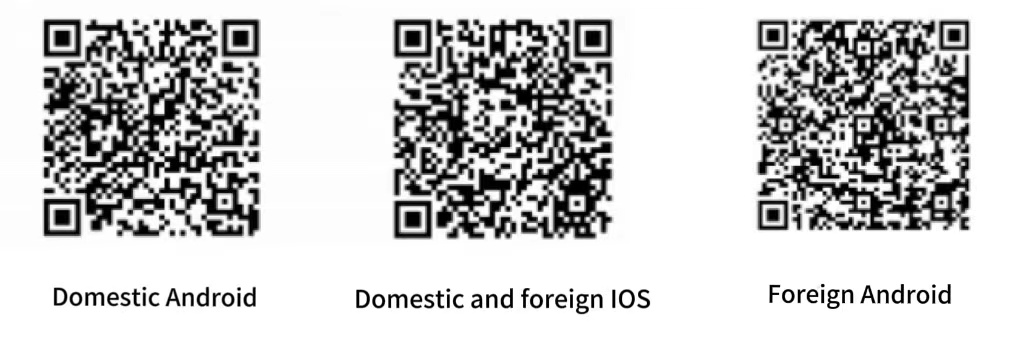
Koj yuav tsum siv SMART BMS tshiab pib nrog V3, uas tam sim no tsis muaj nyob rau ntawm cov txee. Koj tuaj yeem luam theej duab QR code hauv qab no kom rub tawm. Muaj tom qab tso tawm.
Hloov kho thiab rub tawm hauv HUAWEI, Google thiab Apple app stores, lossis tiv taujDaly cov neeg ua haujlwm kom tau txais cov ntaub ntawv teeb tsa APP tshiab tshaj plaws.
Pib nrog V2, tsuas yog txhawb nqa Bluetooth modules.
Cov kev ceev faj
1. Nrhiav tsis tau Bluetooth: seb puas tau tso cai rau lub xov tooj ntawm tes, seb puas yogWIFI module tau raug muab tso rau hauv lub network thiab nyob rau hauv lub xeev "online".
2. Kev faib tawm network tsis ua haujlwm: Xyuas seb puas yogWIFI lub network puas zoo li qub thiab seb lub network puas yog 2.4G network.
3. Lub cuab yeej offline: Xyuas seb puas yogWIFI network puas zoo li qub, xyuas seb lub hwj chim BMS puas zoo li qub thiab seb lub cable txuas puas txuas zoo li qub.
nkag mus.
4. Txuas cable: LubWIFI Lub cable txuas module tsis sib koom nrog Bluetooth module. Nws muab faib ua cov buckle terminals raws li cov terminals ntawm lub rooj tsavxwm tiv thaiv thiab tsis muaj terminals. Piv txwv li, cov chaw nres nkoj sib txuas lus ntawm R16L thiab R10Q raug khi, yog li cov xov hlau txuas kuj yuav tsum raug khi.
Lub sijhawm tshaj tawm: Cuaj hlis-23-2023


